


In the previous article, we discussed three topics which are what Amazon S3 is, what are the Amazon S3 security best practices, and we configured the AWS Terraform Provider and variables necessary to build the AWS resources.
In part two, we will review the Terraform code used to deploy the AWS resources and deploy the Terraform code to AWS.
You can access all of the code used in my GitHub repository.

AWS Resources
We will be using Terraform to build the following:
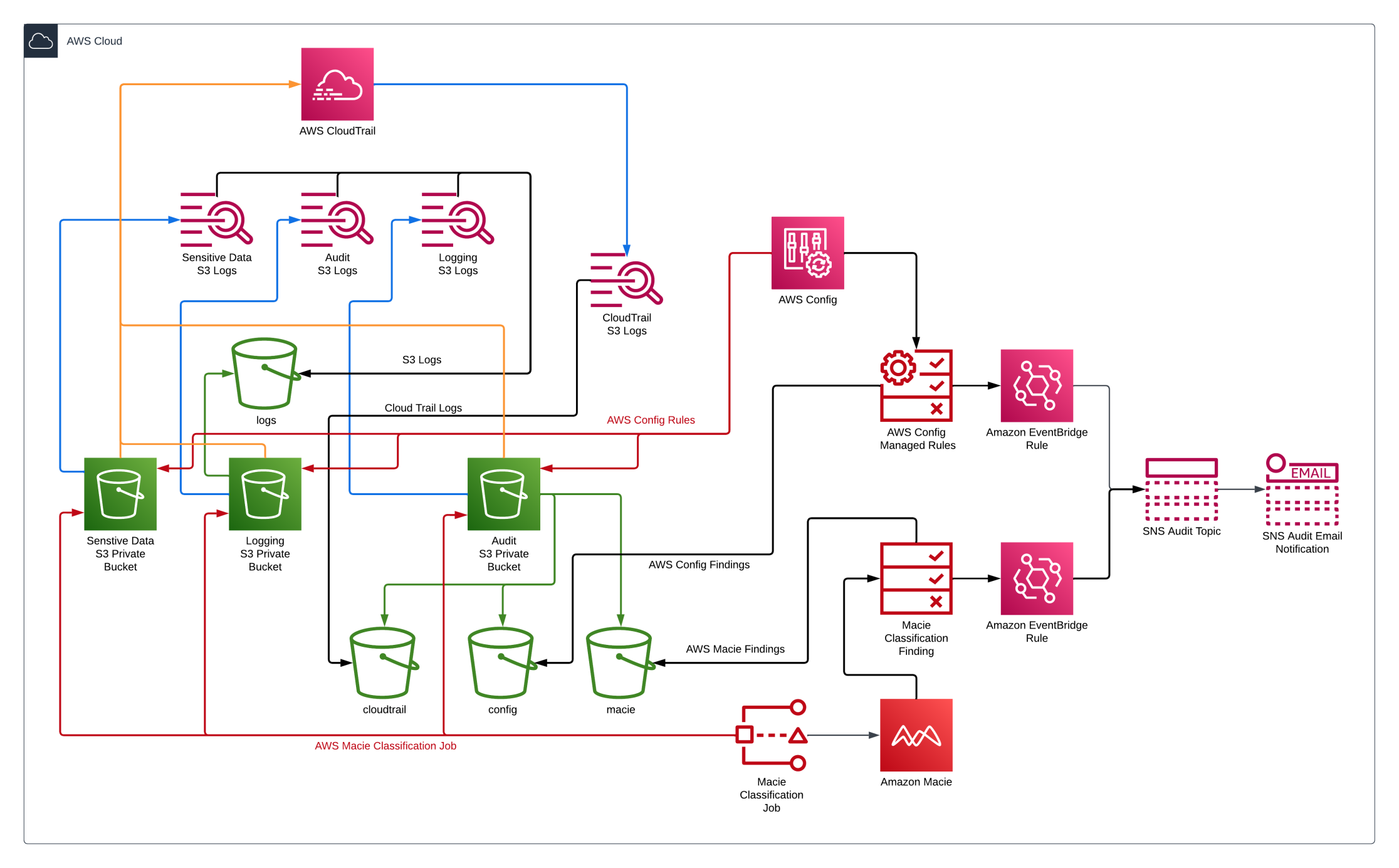
- Amazon S3 Buckets
- AWS CloudTrail
- AWS Key Management Service (KMS)
- Amazon Macie
- AWS Config
- Amazon Simple Notification Service (SNS)
- Amazon Eventbridge
- IAM Policies and Roles
- Review Terraform Code
Amazon S3
Below is the Terraform code for creating the Amazon S3 bucket used to store sensitive data. As discussed in the previous article, several Amazon S3 security best practices are enabled in the code.
s3_lab.tf
module "lab_s3_bucket" {
  source = "terraform-aws-modules/s3-bucket/aws"

  bucket        = local.aws_s3_bucket_name
  force_destroy = true

  server_side_encryption_configuration = {
    rule = {
      apply_server_side_encryption_by_default = {
        sse_algorithm = "AES256"
      }
    }
  }

  block_public_acls       = true
  block_public_policy     = true
  ignore_public_acls      = true
  restrict_public_buckets = true

  versioning = {
    enabled = true
  }

  logging = {
    target_bucket = module.logs_s3_bucket.s3_bucket_id
    target_prefix = "logs/"
  }

  #Bucket policies
  attach_deny_insecure_transport_policy = true

  lifecycle_rule = [
    {
      id      = "archive"
      enabled = true
      abort_incomplete_multipart_upload_days = 7

      transition = [
        {
          days          = 30
          storage_class = "STANDARD_IA"
        },
        {
          days          = 90
          storage_class = "GLACIER_IR"
        }
      ]

      expiration = {
        days = 365
      }
    },
  ]

  tags = {
    Classification = "Sensitive"
  }
}
Terraform code to upload two sensitive files to the S3 Lab bucket.
resource "aws_s3_object" "sensitive_files"
  bucket   = module.lab_s3_bucket.s3_bucket_id
  for_each = fileset("./files/", "**/*")
  key      = each.value
  source   = "./files/${each.value}"
  etag     = filemd5("./files/${each.value}")

  tags = {
    Classification = "Sensitive"
  }
Two additional Amazon S3 buckets are also created but are not reviewed here, which are an Amazon S3 Bucket for storing the logs for each Amazon S3 bucket and an Amazon S3 Bucket to store the AWS Cloudtrail Logs, AWS Macie findings, and AWS Config rule results.
This is the snippet of code in the Terraform code to enable logging for an Amazon S3 bucket.
logging = {
  target_bucket = module.logs_s3_bucket.s3_bucket_id
  target_prefix = "logs/"
}
AWS CloudTrail
The following is Terraform code for creating AWS CloudTrail used to audit Amazon S3.
cloudtrail.tf
#Configure CloudTrail with the S3 bucket and IAM role
resource "aws_cloudtrail" "cloudtrail" {
  name                          = "${local.aws_s3_bucket_name}-cloudtrail"
  s3_bucket_name                = module.audit_s3_bucket.s3_bucket_id
  s3_key_prefix                 = "cloudtrail"
  is_multi_region_trail         = false
  include_global_service_events = true
  enable_log_file_validation    = true
  enable_logging                = true

  event_selector {
    read_write_type           = "All"
    include_management_events = true

    data_resource {
      type = "AWS::S3::Object"
      values = [
        "${module.audit_s3_bucket.s3_bucket_arn}/",
        "${module.logs_s3_bucket.s3_bucket_arn}/",
        "${module.poc_s3_bucket.s3_bucket_arn}/",
      ]
    }
  }

  depends_on = [module.audit_s3_bucket]
}
Amazon Macie
The following is an excerpt of Terraform code for creating Amazon Macie used to monitor and detect sensitive data in Amazon S3 objects. As you can see, this code enables Amazon Macie and creates an Amazon Macie classification job that runs one-time.
macie.tf
#Enable Amazon Macie
resource "aws_macie2_account" "macie" {
  finding_publishing_frequency = "FIFTEEN_MINUTES"
  status                       = "ENABLED"
}

#Create Classification Job for Amazon Macie
resource "aws_macie2_classification_job" "macie_one_time" {
  job_type = "ONE_TIME"
  name     = "${local.aws_s3_bucket_name}-macie-job"

  s3_job_definition {
    bucket_definitions {
      account_id = data.aws_caller_identity.current.account_id
      buckets    = [local.aws_s3_bucket_name]
    }
  }

  sampling_percentage = 100

  depends_on = [
    aws_macie2_account.macie,
    module.audit_s3_bucket
  ]
}
AWS Config
Below is an excerpt of Terraform code for creating AWS Config rules for monitoring Amazon S3 configurations. Each of these rules is an AWS Config managed rule that can be enabled. If you would like to see the other AWS Config managed rules can be reviewed here.
config.tf
# Configure AWS Config Rules for monitoring Amazon S
resource "aws_config_config_rule" "s3" {
  for_each = {
    s3-bucket-versioning-enabled             = "S3_BUCKET_VERSIONING_ENABLED"
    s3-bucket-ssl-requests-only              = "S3_BUCKET_SSL_REQUESTS_ONLY"
    s3-bucket-server-side-encryption-enabled = "S3_BUCKET_SERVER_SIDE_ENCRYPTION_ENABLED"
    s3-bucket-logging-enabled                = "S3_BUCKET_LOGGING_ENABLED"
    s3-bucket-acl-prohibited                 = "S3_BUCKET_ACL_PROHIBITED"
    s3-event-notifications-enabled           = "S3_EVENT_NOTIFICATIONS_ENABLED"
    s3-bucket-level-public-access-prohibited = "S3_BUCKET_LEVEL_PUBLIC_ACCESS_PROHIBITED"
  }

  name = "${local.aws_s3_bucket_name}-${each.key}-config-rule"

  source {
    owner             = "AWS"
    source_identifier = each.value
  }

  scope {
    tag_key   = "Project"
    tag_value = local.project
  }

  depends_on = [aws_config_configuration_recorder.config]
}
Amazon Eventbridge
With Amazon Eventbridge, you can send notifications on several findings. The code below shows how Amazon Eventbridge will send a notification to an Amazon SNS topic when Amazon Macie produces any findings. Any subscribed users will be emailed once the notification is sent to the Amazon SNS topic.
eventbridge.tf
# Create Amazon Eventbridge Rule for Amazon Macie findings
resource "aws_cloudwatch_event_rule" "macie" {
  name        = "${local.aws_s3_bucket_name}-aws-macie-rule"
  description = "Capture macie"

  event_pattern = jsonencode({
    source = ["aws.macie"]
    detail-type = [
      "Macie Finding"
    ]
  })
}

resource "aws_cloudwatch_event_target" "config-macie" {
  rule      = aws_cloudwatch_event_rule.macie.name
  target_id = "SendToSNS"
  arn       = aws_sns_topic.sns.arn
}
We just finished reviewing Terraform code to create and secure Amazon S3 Buckets. Several of the code blocks from above are just snippets of code. Please see the git repo for the complete code.
Deploy Terraform code
Follow these steps to set up the AWS resources and environment:
terraform init
terraform validate
terraform plan -out=plan.out
terraform apply plan.out
After completing these steps, the Amazon S3 Buckets should be configured and secured.
Below is what you should see after you finish the terraform commands.

Conclusion
This article reviewed the Terraform code used to deploy the AWS resources and successfully deployed the Terraform Code to AWS. We now have an Amazon S3 Bucket containing sensitive data that is secure and protected with Amazon S3 best practices. Amazon Macie monitors the Amazon S3 bucket to scan for sensitive data. 2 additional Amazon S3 buckets were created to help secure all of the Amazon S3 buckets. A dedicated Amazon S3 Bucket stores all the Amazon S3 Logs from all Amazon S3 buckets. The final Amazon S3 bucket stores the CloudTrail logs, the Amazon Macie findings, and the AWS Config finding.
In part three, we will validate that the Amazon S3 best practices were followed when deploying the code with Terraform, review the findings for Amazon Macie and AWS Config findings, and validate that email notifications are being sent for Amazon Macie and AWS Config findings. Last, we will run some tests to see if we can detect any changes to the Amazon S3 buckets.